

 |
 |
 |
 |
 |
| Box Contents | ||||||||
|


| Installation Drawing |
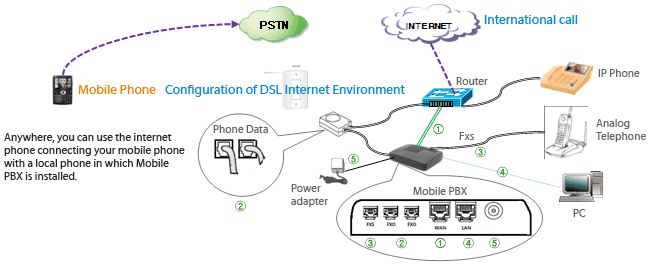 Installation sequence 1. Connect the power adapter with the DC input port of mobilePBX. 2. Connect the jack of home hone line with the FXo port of mobilePBX. 3. In case of common analogue phone, connect the jack of the phone with mobilePBX FXs port. 4. Connect DSL or cable internet line jack with the WAN port of mobilePBX. 5. Connect the LAN cable of IP Phone with mobilePBX LAN port. Please see the user guide book to configure PBX function from the Web |

U.S. Office Add : 650 East Devon Avenue, Suite 133, Itasca, IL 60143 USA Tel : +1-630-875-9750
Korea Office Add : #501, SamHyun Bldg, 508-3 Sinsa-Dong,Kangnam-Gu, Seoul, South Korea Tel : +82-2-542-0777
Colombia Office Add : Carrera 106 No. 15-25, Interior 31, Bodega 6, Bogota, Colombia Tel : +82-2-542-0777
Korea Office Add : #501, SamHyun Bldg, 508-3 Sinsa-Dong,Kangnam-Gu, Seoul, South Korea Tel : +82-2-542-0777
Colombia Office Add : Carrera 106 No. 15-25, Interior 31, Bodega 6, Bogota, Colombia Tel : +82-2-542-0777
Copyrightⓒ 2010 hellodial. All Rights Reserved.